CoreVideo Pro Architecture
CoreVideo Pro is a live-production studio for Windows and macOS, built around a native media core. It is in development and not released: this guide is a design document describing how the product is architected, in the present tense the way architecture is normally written, and not a claim that every stage below is finished. It describes end to end — how Zoom participants and local cameras are captured, how frames are composited and directed, and how program, ISO, and streaming outputs are produced. For the OBS plugin's internals, see the Core Plugin guide.
Design principles
- Native media core, web renderer. A C++ media core owns the real-time pipeline; the React/Vite renderer drives the UI and never touches media frames directly.
- Typed IPC contracts. The renderer and core talk over typed command/state contracts, so the host shell (Electron, Tauri, or a custom native shell) stays replaceable.
- Process isolation. The Zoom Meeting SDK runs in its own process, so an SDK crash cannot take down the operator console.
- Local-first. Capture, compositing, recording, and streaming all run on the operator's machine; nothing is routed through a third-party cloud.
System architecture
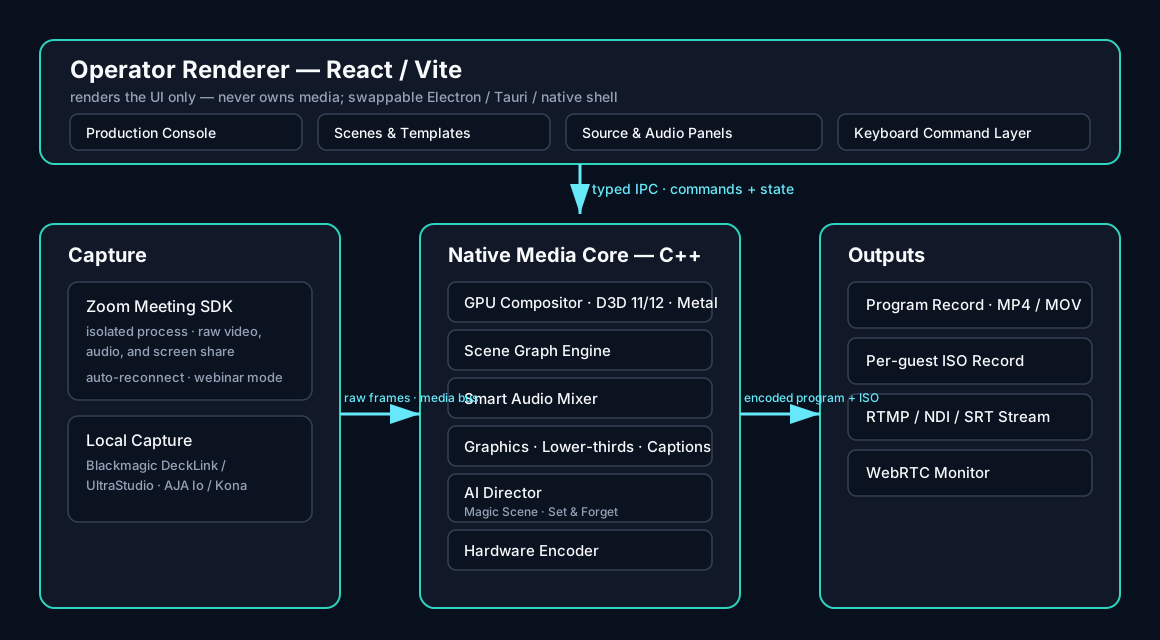
The operator renderer presents the production console, scene and template editor, source and audio panels, and a keyboard command layer. It issues typed commands (assign slot, take, arm record, start stream) and receives typed state snapshots (feed health, output status, levels). It renders no media itself.
The native media core receives raw frames over a shared media bus, composites the active scene graph on the GPU, mixes audio, draws graphics and captions, and hands a program feed to the hardware encoder. The outputs stage records the program and per-guest ISOs and streams to one or more destinations.
Capture and the media core
Zoom media is captured through the Zoom Meeting SDK's raw video and audio APIs in a dedicated capture process — no window grabbing, virtual cameras, or display capture. Each participant becomes a clean video, audio, and screen-share source with a full data model: name, role, talking/mute/video state, spotlight, breakout room, and feed quality.
Local cameras from Blackmagic (DeckLink, UltraStudio) and AJA (Io, Kona) devices are detected on launch and on hot-plug, and appear as first-class sources alongside Zoom participants. Frames move from the capture process to the core over a shared media bus as GPU textures, so large frames are never copied through the IPC pipe. The GPU compositor renders with Direct3D 11/12 on Windows and Metal on macOS.
Production pipeline
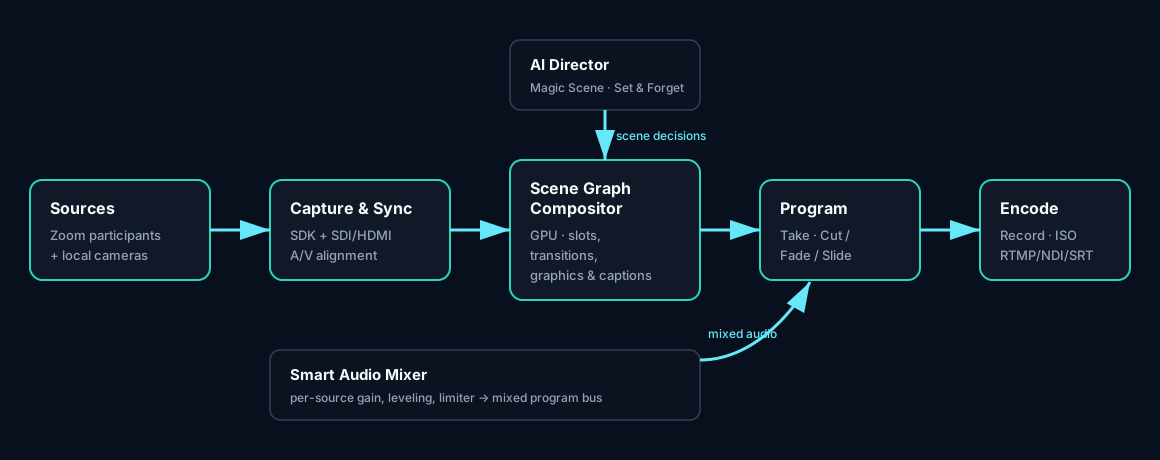
Sources are captured and synchronised, then routed into the scene-graph compositor. A scene is a template with typed slots (fixed, host, presenter, active speaker, screen share, gallery, fallback), assignment rules, and safe regions for lower-thirds and captions. Producers work in a program/preview model: stage a layout, then Take it to program with a Cut, Fade, or Slide transition.
The AI director watches the live call and feeds scene decisions into the compositor; the audio mixer levels every source and supplies the mixed bus to the program feed. The program feed is encoded once on hardware and fanned out to recording, ISO, and streaming.
AI direction
Magic Scene inspects participant count, roles, screen-share, and the active speaker, picks a template, fills the slots, adds lower-thirds and captions, applies the brand kit, and produces a ready-to-stream scene set you can accept, regenerate, or edit. Set & Forget then runs the show: it switches on active speaker and screen share, holds shots to avoid rapid cutting, reveals lower-thirds, and returns to the host or panel. Manual overrides always win, with one click back to automatic.
Audio
Each Zoom participant and local source has independent gain with smart auto-leveling and a manual trim on top, per-source noise suppression, and mute/solo. A master meter provides a limiter and clipping warnings, and an A/V sync offset aligns local capture with Zoom audio.
Graphics, captions and branding
Lower-thirds are generated automatically from each participant's Zoom name and role and can be overridden; they reveal and hide on cue and reposition to avoid collisions. Real-time program captions carry speaker attribution. A brand kit (logo, color, font, background) is applied automatically, alongside a brand bug, banners, call-to-action overlays, and per-source chroma key.
Outputs
CoreVideo Pro records the program to MP4/MOV (up to 4K, 30/60fps) and captures per-guest ISO feeds for clean re-edits. Streaming targets RTMP, NDI, and SRT with YouTube, Twitch, and custom presets and a multi-destination model that tracks armed/live state, bitrate, latency, and health per destination. Hardware encoders (NVENC, Quick Sync, AMF on Windows; VideoToolbox on macOS) keep CPU load low, and an output preflight blocks streaming when a destination is missing an endpoint, key, or compatible URL.
Platform and shell
The renderer is shell-agnostic: it runs inside whatever native host is present (Electron, Tauri, or a custom shell) and falls back to mock engines only for local development. Engine bundles are injected, so the UI swaps simulated engines for the native Zoom, media, and output implementations without importing mock singletons. The native media core stays the durable part of the product; the shell and renderer can evolve independently behind the typed IPC contracts.